

Description
Download Easy Sketch Pose – 3D sketching, 2D drawing, character posing, art tool, digital art, animation, workflow
Overview
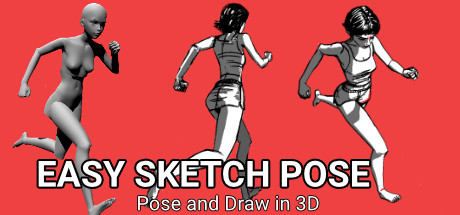
Easy Sketch Pose is a digital art simulation tool designed for artists seeking a streamlined workflow between 3D posing and 2D drawing. The software enables users to position characters and static objects within a 3D environment, then draw directly over them in 2D with intuitive controls. This hybrid approach bridges the gap between spatial visualization and hand-drawn expression, offering a unique experience for concept artists, animators, and illustrators. The developer has not shared detailed story information, as the product is a creative tool rather than a narrative-driven game. Its primary focus lies in functionality, usability, and integration into professional art pipelines. The software is built for users who value precision, speed, and flexibility in their creative process. While no official gameplay mechanics were disclosed, the experience centers around scene setup, pose manipulation, and drawing output. The target audience includes digital artists, animation studios, and hobbyists looking to enhance their workflow with a simple yet powerful tool. The developer, Easy Sketch, positions the product as a solution for simplifying 3D sketching, emphasizing accessibility and efficiency.
Gameplay & Core Mechanics
The core experience of Easy Sketch Pose revolves around a dual-layered creative process: 3D scene construction and 2D drawing over those scenes. Users can manipulate characters and static objects in a 3D space, adjusting their positions, angles, and orientations with ease. Once the scene is set, the interface allows for direct 2D drawing over the posed elements, enabling artists to sketch with natural flow and alignment. The tool features intuitive controls designed for simplicity, minimizing technical barriers for users of varying skill levels. No official gameplay modes or missions were provided, as the product is a simulation rather than a game. The pacing is user-driven, allowing artists to work at their preferred speed without time constraints or objectives. Key features include full lighting setup, customizable visual styles, and the ability to export individual layers as separate PNG files for use in other digital art applications. This facilitates seamless integration into existing workflows, particularly for animation and concept art. The developer did not provide additional gameplay details beyond the core functions.
Key Features
- 3D character and object posing with full range of motion
- 2D drawing interface overlaid on 3D scenes
- Real-time lighting adjustments for scene atmosphere
- Multiple visual styles and rendering options
- Export individual layers as PNG files for external use
- Simple, intuitive controls for quick setup and drawing
Graphics, Audio & Performance
Easy Sketch Pose presents a clean, functional visual interface optimized for creative work. The 3D environment supports detailed scene construction with full lighting and various visual looks, enhancing the accuracy and depth of posed elements. Animations are smooth and responsive, contributing to a fluid user experience during pose adjustments. The rendering style is designed to support clarity and precision in drawing, prioritizing visual fidelity over stylized effects. Sound design is minimal, focusing on subtle feedback cues during interactions rather than immersive audio. No official performance benchmarks were provided, and detailed graphical settings were not disclosed. The software’s performance is expected to be consistent on compatible systems, though exact technical requirements were not listed. Platform-specific enhancements were not disclosed. Users are advised to ensure their system meets the necessary specifications for optimal operation, especially when working with complex scenes or high-resolution exports.
Platform Compatibility & Requirements
Easy Sketch Pose is available exclusively on Windows. The release version was launched on April 10, 2025. The software is priced at $19.99, offering a one-time purchase model. The developer did not list minimum system requirements, nor were compatibility details fully provided. Users are encouraged to verify their system’s capabilities before installation. No information was shared about cloud integration, updates, or additional platform support beyond Windows. The publisher, Easy Sketch, has not disclosed details on future expansions or downloadable content. For those interested in a full version, the current release provides access to all core features without trial limitations.
Pros and Cons
Pros
- Intuitive interface for seamless 3D posing and 2D drawing
- Efficient workflow with layer export functionality
- Full lighting and visual style customization
- Designed for both beginners and experienced digital artists
- Simple controls reduce learning curve
- Supports integration with external art software
Cons
- No official system requirements were provided
- Platform availability limited to Windows
- Minimal audio feedback may not suit all users
- Limited information on update frequency or future features
- No multiplayer or collaborative tools were mentioned
FAQ Section
Is Easy Sketch Pose safe to download?
Yes, the software is published by Easy Sketch and distributed through official channels. As a digital art tool, it does not contain malicious content and is designed for creative use.
Is it beginner-friendly?
Yes, the tool features simple controls and an intuitive interface, making it accessible to artists with little to no prior experience in 3D sketching.
Does it receive regular updates?
The developer has not specified the update schedule. However, as a simulation tool, it may receive periodic improvements based on user feedback.
What platforms support Easy Sketch Pose?
Currently, the software is available only on Windows. No information was provided about support for macOS, Linux, or mobile platforms.
Does the game require an internet connection?
While the software may function offline, an internet connection is required for initial activation and potential future updates or license verification.
Final Thoughts
Easy Sketch Pose delivers a focused, efficient solution for artists who need to combine 3D posing with 2D drawing in a streamlined workflow. Its strength lies in simplicity and integration—offering powerful tools without unnecessary complexity. The ability to export individual layers as PNG files makes it a valuable asset in professional and personal art pipelines. While platform availability is currently limited to Windows and system requirements remain undisclosed, the tool’s design prioritizes usability and creative freedom. It fills a niche for digital artists and animators seeking a reliable, fast, and accessible 3D sketching companion. For those looking to enhance their drawing process with spatial accuracy and visual depth, Easy Sketch Pose stands out as a practical and well-structured tool. Download Easy Sketch Pose now.
Guides & Tutorials for Easy Sketch Pose
How to install Easy Sketch Pose
- Click the Preview / Download button above.
- Once redirected, accept the terms and click Install.
- Wait for the Easy Sketch Pose download to finish on your device.
How to use Easy Sketch Pose
This software is primarily used for its core features described above. Open the app after installation to explore its capabilities.
User Reviews for Easy Sketch Pose 0
No reviews found




